AI-first traceability that humans actually want to look at
Formly's new traceability matrix auto-links every requirement from User Needs through Validation, exposes that traceability graph to AI agents via MCP, and finally looks like something worth using.

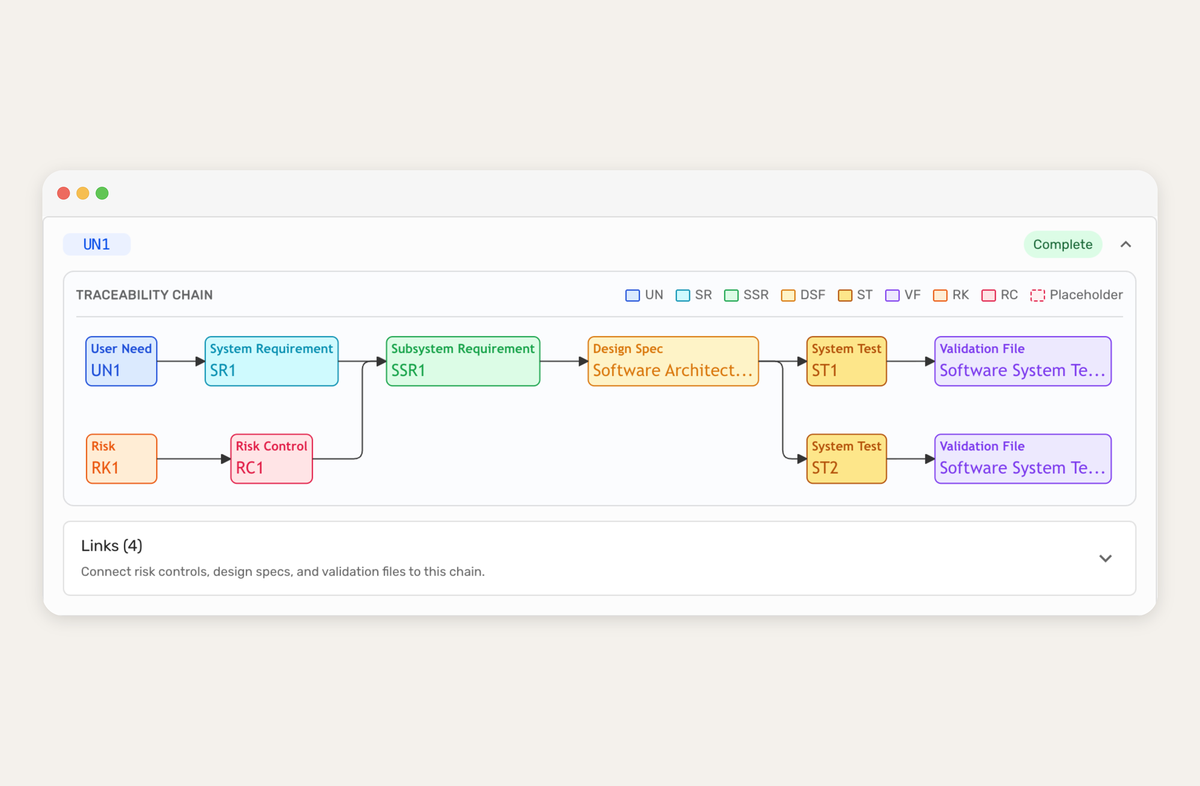
The traceability matrix is the one of the most important artifacts in a medical device submission. In most eQMS tools it's also the ugliest, slowest, and most manual thing you'll ever dread maintaining. Open a legacy system and you get a wall of cells. Open Formly and you get an intuitive graph. And for the part that's actually new, your AI agent can read it too.
We shipped our new traceability matrix today. It's visual, it's auto-populating and it identifies its own gaps. Even better, every node in it is exposed as structured data (via Mermaid syntax) through our MCP server which means Claude, ChatGPT or any agent you use, can reason about your traceability the same way your RA lead does. Here's what we built, why we built it that way, and why we continue to double down on "AI-first" as the actual architecture.
What a traceability matrix actually is (and why it's a nightmare)
If you're evaluating an eQMS for the first time, the traceability matrix is the thing that proves your device is built correctly, does what it's supposed to do, and that every risk you identified was actually controlled. It's the backbone of your Design History File. FDA 21 CFR Part 820, ISO 13485, and IEC 62304 all require it. Not by name in every case, but traceability is key to all of them.
The chain looks roughly like this: a user need (the doctor needs to know the patient's oxygen saturation) flows down to a system requirement (the device shall display SpO₂), then to a subsystem requirement (the pulse oximeter module outputs a calibrated value every 250ms), then to a design spec (the specific algorithm and hardware doing the work), then to verification tests (did we build it right?) and validation tests (did we build the right thing?). Risk runs parallel as each identified risk gets a risk control, and that risk control has to trace back into the main chain.
In a spreadsheet, this is hell. One row per requirement (or multiple). A mass of columns. Hundreds of rows. You rename a requirement and seventeen cross-references go stale. You add a new risk and nobody remembers to link it’s risk control back to the requirement it relates to. Come audit week, some poor soul spends three days reconciling it by hand. In a legacy eQMS it's usually a prettier spreadsheet. However, the same fundamental problem exists: the relationships are implied by cell positions, not explicit as a graph. You can't see which user needs are orphaned.
What we shipped
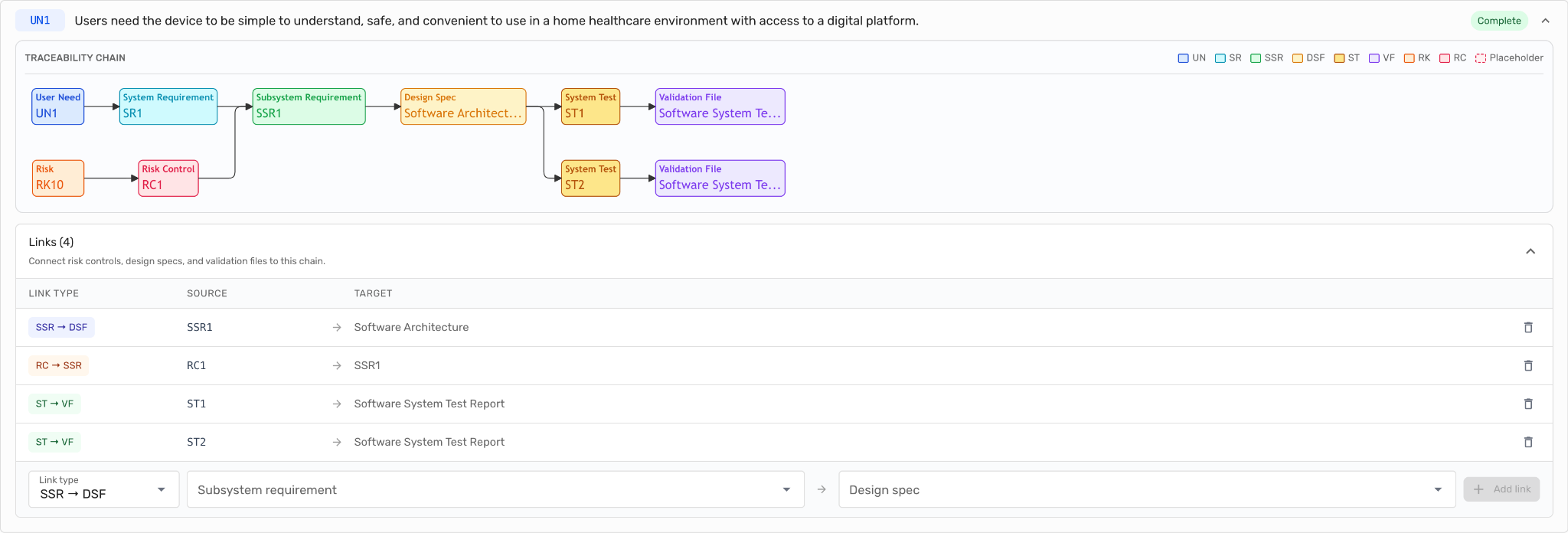
We didn't reinvent traceability, we just stopped hiding it in a table or clunky interface.
Every node in your matrix - User Need, System Requirement, Subsystem Requirement, Design Spec, Verification Test, Validation Test, Risk, Risk Control - is now a node in a graph. The links between them are the links between them. That's it.
Because it's a graph:
- You can see it. Open the page and your whole chain is in front of you. One glance tells you what's connected and what isn't.
- You can trace it. Follow any user need forward to the tests that validate it, or any test backward to the need that justified it. No filtering, no pivot tables.
- Your AI agent can read it. The same graph that renders for your RA lead is what Claude pulls through our MCP server. No translation layer or lossy export.
Auto-linking, and the death of "the matrix is out of date"
The second you edit one requirement, every downstream link updates so the matrix doesn't drift. That's table stakes for any modern tool, and most of the "legacy eQMS" crowd will tell you they do it too. What they usually don't do though is draw missing links.
In Formly, when you have a user need with no validation test, the graph doesn't hide the problem but renders the missing node in red with a dashed border. "No Validation File", "No Risk Control" or "No Design Spec." Anywhere there's a hole, it lets you know.
In most legacy systems, a missing link is an empty cell. Empty cells don't make noise. That's why audit week exists where the noise arrives all at once, two weeks before the inspector does. We'd rather have the noise on day one of development, and it be continuously visible.
The graph: why humans stopped dreading the matrix
We picked a graph over a table for a reason more pragmatic than aesthetic: a table hides relationships, and a graph reveals them. A QA lead glancing at a graph can spot a dangling requirement in three seconds. The same task in a spreadsheet is thirty minutes of scrolling, filtering, and hoping.
Here's what one traceability chain looks like in our product:
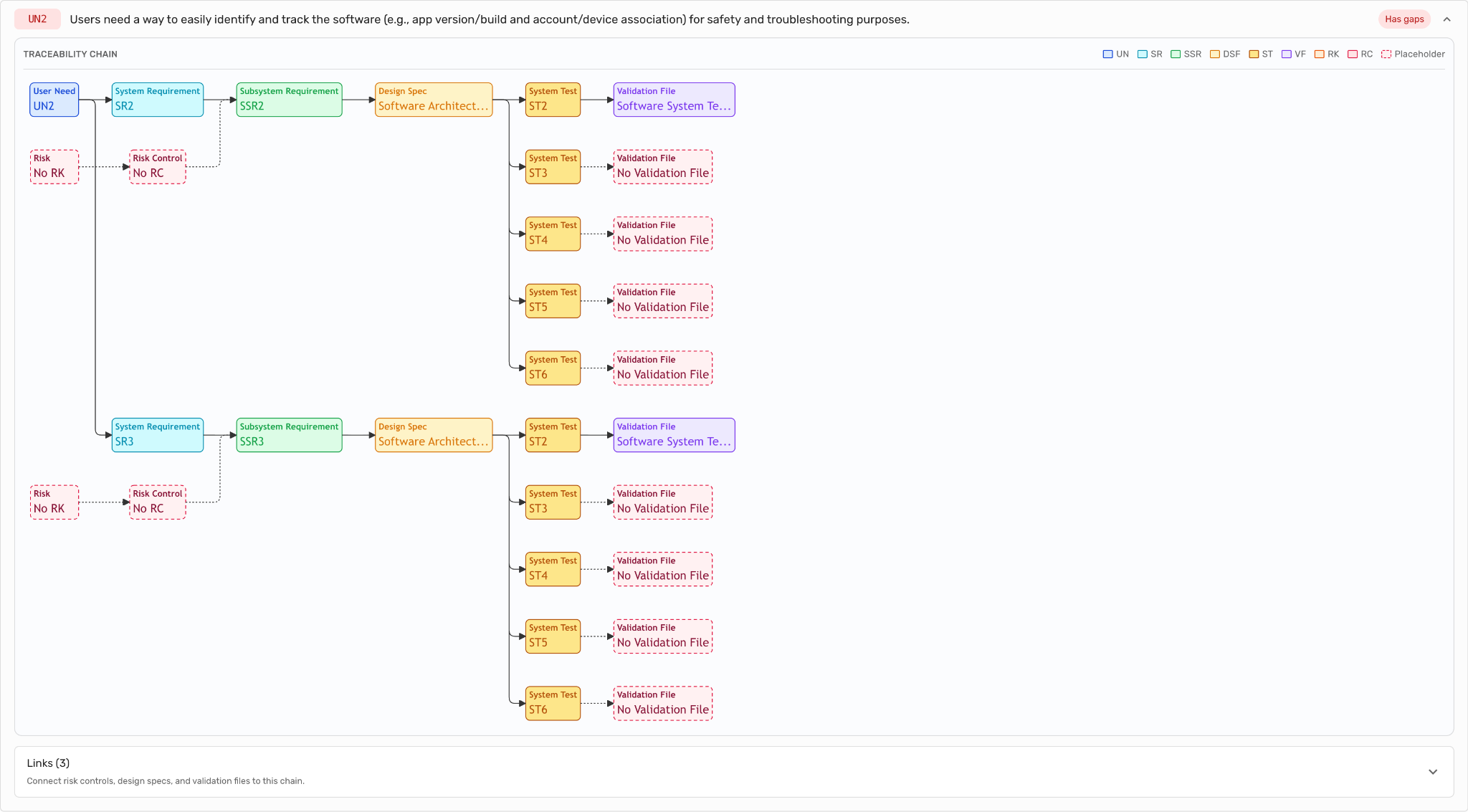
For a human, this reads nicely but for AI we deliver it as something like that:
flowchart LR
  UN1["User Need: UN1"]
  SR1["System Requirement: SR1"]
  SSR1["Subsystem Requirement: SSR1"]
  RC["Risk Control: No RC"]
  RK["Risk: No RK"]
  DS["Design Spec: No Design Spec"]
  ST1["System Test: ST1"]
  VF1["Validation File: No Validation File"]
  ST2["System Test: ST2"]
  VF2["Validation File: No Validation File"]
  UN1 --> SR1
  SR1 --> SSR1
  SSR1 -.-> DS
  DS -.-> ST1
  DS -.-> ST2
  ST1 -.-> VF1
  ST2 -.-> VF2
  RK -.-> RC
  RC -.-> SSR1
For your AI agent this is pure gold because it reveals the relationships in a structured and easy-to-realize, reasonable way using a standard language called Mermaid. That’s because the latest frontier models have been trained on Mermaid a lot. They know very well how to read that syntax.
A few things to notice. Each node type has its own color, so you can read the chain at a glance without reading a single label. Solid arrows are required links; dotted arrows are optional or incomplete. And the red-dashed nodes "No Risk Control," "No Design Spec," "No Validation File" are placeholders. The graph is telling you exactly what's missing and where. You don't audit this matrix. The matrix audits itself, and shows you what's left.
Click any node and you jump straight into the underlying artifact in Formly. Rather than a static diagram, the graph is the navigation layer for your entire DHF.
You don't prep for an audit, you can actually collaborate with your AI, find what's missing, fix it, lock it under doc control, and move on. The tools that make this possible will make quarterly audit prep feel like checking the weather. The tools that don't will keep shipping compliance calendars.
The AI-first part: why your traceability should be readable by Claude
Every other eQMS on the market is racing to bolt AI inside their product. AI-drafted risk items, compliance assistants and AI workflows. It's all good work but it’s locked behind their UI.
We took the opposite path. Formly exposes the traceability matrix as structured graph through our MCP server, which means any MCP-compatible AI client like Claude, ChatGPT, Copilot or a custom agent you build can read your matrix, reason over it, and answer questions about it from outside Formly entirely.
A few things this unlocks in practice:
- "Which user needs don't have a validation test yet?" Your agent pulls the graph, filters for User Need nodes with no downstream Validation File, and hands you a list. You can then subsequently work with the agent on fixing those gaps by using the other tools our MCP server exposes.
- "If I change the wording of SR-14 what downstream artifacts need review?" The agent walks the graph forward from SR-14, enumerates every SSR, Design Spec, and test node, and hands you the change-impact analysis you'd normally pay a consultant for.
- "Draft me a Section 5.6 design controls summary for the 510(k) based on the current matrix state." The agent has the whole graph. It can write coherently about what you've verified, what you've validated, and what's still open.
None of this requires us to ship a "Formly AI" sidebar. You use Claude or ChatGPT or you can use it in our software, but you're not limited to it. The tools come to you, not the other way around.
This is why we think AI-first is architectural, not cosmetic. We didn't add AI to an eQMS. We made the eQMS's most important artifact AI-readable from day one. If you want to go deeper on how the MCP server works, our MCP docs walk through setup and the full tool surface.
Why this matters if you're evaluating an eQMS right now
Three things to take away if you're a founder or RA lead comparing tools in 2026:
Audit readiness is now a query, not a project. You don't prep for an audit, you can actually collaborate with your AI, find what's missing, fix it, lock it under doc control, and move on. The tools that make this possible will make quarterly audit prep feel like checking the weather. The tools that don't will keep shipping compliance calendars.
AI-readiness is a procurement filter now. If your eQMS doesn't expose your own data to your own AI tools, you're paying for a walled garden. The vendors that keep their data siloed behind a proprietary UI are the ones you'll be migrating off of in three years.
Best-in-class human UX and best-in-class machine-readability is not a trade-off. We built both because we had to. Our own team uses Claude against Formly data every day, and the team also has to use the UI to get actual work done. If either side of that fails, we feel it immediately.
Try it
Traceability is the part of your QMS you stop thinking about when it works and obsess over when it breaks. We built ours so the working state is the default and the broken state is impossible to miss. For you, for your team and for the AI agent you're going to be using whether your eQMS vendor knows it yet or not.